computer studies
Introduction to Computers
This chaapter introduces the student to what a computer is, classifies computers into different categories, compares the different classes of computers and also introduces the keyboard as as a basic input device.
1.1 Definition of a computer
1.2 Classification of computers
1.2.1 Physical size
1.2.2 The way they process data
1.2.3 By purpose
1.2.4 By use
1.3 Acquisition of Keyboard skills
1.3.1 Layout of keyboard
1.3.2 Summa
1.3.3 Questions
Information is result from processed data. For example adding some numerical values like the numbers 14 and 17 into the computer will give you the result of 31. The later is information you required. Information can be defined as data computed into a more useful form than raw form.
Program is a series of instructions written in the language of the computer for them to obey and perform specific tasks as outlined by the instructions.
A Computer can therefore be defined as "an electronic machine that takes in data (facts) in the raw form, processes the data to give out in another form called information".
When a computer is fed with data, it passes through four basic steps before the data can be displaced;
(i) Input Process — the user will type the data from say the keyboard (to be introduced later in the chapter)
and the computer will accept the dame and store within it.
(ii) Storage Process — the data that is fed into the computer at the same time is held, even during the time of processing and after processing; it can further be stored for further reference.
These data are held in computer memory.
(iii) Processing — the computer will manipulate the data held within it to a more useful form — results (information
(iv) Output process - the user is given the information he desired
The four basic processes can be summarized in the following way by looking at the same terms of information processing cycle.
Organizing data for processing — to get quality results (information) you must have quality data to start with. Unreliable original data generates unreliable results.
If you give a computer garbage, you get garbage in return. Its called GIGO — Garbage In — Garbage Out.
Information Processing Cycle - Information Processing Cycle includes a series of steps for transforming data into meaningful information for people.
A cycle is defined as a sequence of activities performed in an order that it produces expected and meaningful results.
A Processing Cycle is repeated, it means, if the same resources are used in the same way, the same outcome will result.
The standard cycle followed to process data and deliver information comprises of 4 major functions:
(i) Input Function - the input function gathers and collects stored data items and enter them into the system for processing.
Input can come from many sources, for example from files kept in the office, banking institutions and accounts.
(ii) Storage Function — this function allows the user to store data being processed in the memory of the computer as well as to store the information for future use.
(iii) Processing Function — the desired operation by the user is carried out on the data keyed in and stored in the memory so as to turn it into meaningful information.
(iv) Output Function — the data stored is processed and then output into files, printed as hard copies or displayed on the screen for the user.
Note: For any information processing system to run smoothly on a day-to-day basis, the processing activities must be organized.
A system has little work if it provides helpful information on one day and useless information the next day. Output should be useful the first time and every time for the system.
1.2 Classification of Computers
There are four basic ways by which computers can be classified:
(i) Physical size i.e how large the computer is.
(ii) By the way they process data
(iii) By purpose
(iv) By use
1.2.1 Physical Size
The following computer systems are categorized by how large they are:
a) Monster Computer
Sometimes it is referred to as Super computers or Maxi computers. These are computer of enormous power and are very large in size. Its installation requires special floors to carry its weights and it also needs special plumbing to carry a fluid known as fluorocarbon needed to cool it.
One unique feature of maxi computers is that when you purchase it, the purchase price will include the services of 2 permanent engineers to maintain it forever.
They are typically used for scientific research and military applications, petroleum engineering, nuclear physics and meteorology.
Examples of monster computers include CYBER and CRAY computers. For example. the whole globe needs only one monster computer to forecast weather at once.
b) Mainframe Computers
Mainframe computers are second in size to monster computers. These computers perform more data processing work than any other type of computers.
For this reason they form a large portion of installation in most organization.
As does the monster computers, mainframe computers also have some special requirements, for the reason, they are housed in special rooms brought about by the special power that they posses together with environmental control requirements.
Mainframe computers can be used by more than one person at a time since they can support a large network of other computers organizations that employ mainframe computers alongside other computers are banks, government agencies, commercial and industrial agencies.
c) Minicomputer
Also called Medium sized computers. These computers compared to mainframe are smaller, slower and less expensive.
A minicomputer has an advantage over the previous two in the sense that it does not have any special power or environmental control requirements.
For this reason, the medium sized computer can always be located anywhere within the organization. Minicomputers can do the work that the mainframe does but on a small scale.
d) Microcomputers Of the types of computers, microcomputers are the slowest. However, they counteract this disadvantage because they are easy to use and the cost of purchase is also low.
A microcomputer gets its name from the fact that its main computing component, the microprocessor (to be introduced later) is located in one integrated circuit (IC) or what we call a Chip.
Microcomputers fit nicely on desktops, for that reason they are sometimes known as Desktop Computers.
They are also referred to as Personal Computers since many individuals purchase them for personal use.
1.2.2 Type of data processed
Classification of computers by the way they process data falls into 2 main types with the third being a combination of the two:
(i) Analog and
(ii) Digital Computers
(iii) Hybrid

(i) Analog Computers
These computers process data that vary continuously, for example variations in temperature, amount of current flowing through an electrical conductor and so on.
The flow of such data is in the form of wave like movement i.e. not predictable. Such computers are used for a wide variety of industrial and scientific applications that require the processing of data that are measured continuously. In conclusion, we say that analog computers measure things.
(ii) Digital Computers
As opposed to analog computers, these type count things. Data passed to a digital computer is usually operated on in steps i.e. form of discrete numbers, 0, 1, 2, 3, (a discrete operation). It is like counting on one's fingers (1, 2, 3, 4...). Most computers in use today are digital.
This is because there are more counting applications than there are applications
than there are applications that requires continious measurements
(iii) Hybrid Computers
These computers possess features of both digital and analog computers meaning both counting and measurement operations in one computer.
1.2.3 By Purpose Classification by purpose falls into 2 categories:
a) Special Purpose Computers
These are computers that are single task oriented. In other words, they are designed to solve only a particular type of problem.
Examples include embedded computers in our common digital watches.
b) General Purpose
Computers These are computers that can perform a vast number of operations or solve problems of different varieties.
Most of the computers in use today are general purpose. However, it is wise to note that general-purpose computers can always be adapted with special programs to do a job specified hence becoming special purpose computer.
c) Embedded Computers
These are computers attached to other computers that help in operating them. E.g. computers embedded in lifts, petrol pumps, digital watches and so on.
1.2.4 By Use
It is worthy noting that we categorize these computers according to what it is used for and when it is used. Under this category, the list is endless. For this reason we will limit ourselves to only five main types.
(I) Personal Computers or Desktop Computers
These are also known as Microcomputers. They get their name from the fact that they fit nicely on the desktop. They can also be used on the desk in the office environment or for personal use at home.
(ii) Home based Computers
These computers are those designed to be used at home. An individual may install only games program in it or a word processor to enable them write letters, still some would install accounting packages to enable them budget and control their finances at home.
(iii) Lap top Computers
These computers get their name from the fact that you can place them on your laps while using. They are very small computers that have the structure of a briefcase i.e. you open and close the same way.
These have a keyboard attached to them and a flat screen together with a mouse ball and chargeable batteries. This means that you can use them in the rural areas where the is no electricity.
Laptop computers also have ports (small slots) through which you can attach an external keyboard, mouse or external drive like drive A:.
1.3 Acquisition of Keyboard Skills
There are many ways to enter data into the computer. However, keyboard still remains the predominant input device for the many users.
A computers keyboard is used much like a typewriter keyboard. A keyboard has alphabetic, numeric, and special characters found on a typewriter.
The only difference is that data keyed in, is recorded in the computer systems' data coding scheme and is stored in the memory.
The traditional format of a computer or terminal keyboard follows the organization prescribed by the typewriter keyboard.
This is known as QWENTY keyboard because of the sequence of the six letters on the upper left corner of the alphabet position of the typewriter keyboard.
1.3.1 Layout of Keyboard and Functions of Keys
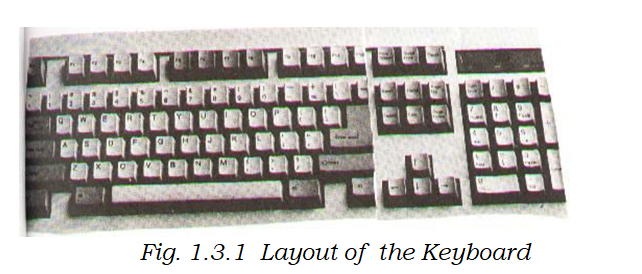
A typical keyboard takes the form of a normal typewriter keyboard.
A keyboard usually has standard keys; that is letters of the alphabet plus special characters e.g„,,?, `, @ e.t.c. In addition to the standard keys, one finds a numeric keypad which is essential for applications that require entry of large amounts of numerical information.
Function Keys are identified as Fl through F12, they can be programmed to ease the work of frequently used operations. Cursor control keys of direction keys ) the ones with arrows, move the cursor on the CRT (screen).
Other special keys include: Delete keys and backspace keys which deletes characters. Delete key deletes a character that is in front of the cursor whereas backspace key delete characters before ti+eursor.
Insert key will insert characters from text. Others e.g home key will take you to the top of the document and end key to the end of the document.
Computer keyboard employ one or more control keys.
Control works just like the shift key on a keyboard in that they cause other keys to perform functions different from their normal operations. Example, if you hold shift key down and press the letter "e", you get a different character "E".
Holding down the control key while you press any of the other keys causes still another character to be sent to memory. Like the control keys, the escape key is used to cause other keys to perform special functions. Unlike the control keys, however, it is not held down while pressing another key.
Once sending_ a signal to the corn uter s stem for that ur ose.
If you press another key following Escape, it will cause the computer to execute a function established by the program in use.
1.3.2 Summary
❖ A computer is a device that takes data in one form and processes it to give out in another form called information. + Data is the name given to facts. + Information is processed data.
❖ Program is a set of instructions written in the language of the computer indicating what the computer is to perform.
❖ 4 basic functions of a computer: Input, Storage, Processing and Output.
❖ Computers can be classified by: Size, The way they process data, By Purpose and by use.
❖ Typical keyboard is the same as a typewriter keyboard, has: standard keys, Numeric Keypad, Function keys, Cursor Control keys or Direction keys, Control Keys, Alternate keys, Escape keys e.t.c.
1.3.3 Questions:
i. Define a Computer.
ii. Differentiate between Data and Information.
iii. What is a Computer Program,
iv. What are the 4 basic functions a Computer will perform on data.
v. Discuss in detail how computers can be classified.
vi. Discuss the layout of a typical keyboard and functions of the different keys.
Chapter 2
Computer Components
This chapter introduces the student to the computer hardware system.
At the end of the chapter, the student should be able to:, differentiate between hardware and software, identify the elements of a computer systems' hardware, explain the functional organization of the elements of a computer system, describe the central processing unit, describer the types of input and output devices, describe the types of secondary storage devices and media and finally be able to distinguish between system software and application software.
Introduction to Computers
This chaapter introduces the student to what a computer is, classifies computers into different categories, compares the different classes of computers and also introduces the keyboard as as a basic input device.
1.1 Definition of a computer
1.2 Classification of computers
1.2.1 Physical size
1.2.2 The way they process data
1.2.3 By purpose
1.2.4 By use
1.3 Acquisition of Keyboard skills
1.3.1 Layout of keyboard
1.3.2 Summa
1.3.3 Questions
Information is result from processed data. For example adding some numerical values like the numbers 14 and 17 into the computer will give you the result of 31. The later is information you required. Information can be defined as data computed into a more useful form than raw form.
Program is a series of instructions written in the language of the computer for them to obey and perform specific tasks as outlined by the instructions.
A Computer can therefore be defined as "an electronic machine that takes in data (facts) in the raw form, processes the data to give out in another form called information".
When a computer is fed with data, it passes through four basic steps before the data can be displaced;
(i) Input Process — the user will type the data from say the keyboard (to be introduced later in the chapter)
and the computer will accept the dame and store within it.
(ii) Storage Process — the data that is fed into the computer at the same time is held, even during the time of processing and after processing; it can further be stored for further reference.
These data are held in computer memory.
(iii) Processing — the computer will manipulate the data held within it to a more useful form — results (information
(iv) Output process - the user is given the information he desired
The four basic processes can be summarized in the following way by looking at the same terms of information processing cycle.
Organizing data for processing — to get quality results (information) you must have quality data to start with. Unreliable original data generates unreliable results.
If you give a computer garbage, you get garbage in return. Its called GIGO — Garbage In — Garbage Out.
Information Processing Cycle - Information Processing Cycle includes a series of steps for transforming data into meaningful information for people.
A cycle is defined as a sequence of activities performed in an order that it produces expected and meaningful results.
A Processing Cycle is repeated, it means, if the same resources are used in the same way, the same outcome will result.
The standard cycle followed to process data and deliver information comprises of 4 major functions:
(i) Input Function - the input function gathers and collects stored data items and enter them into the system for processing.
Input can come from many sources, for example from files kept in the office, banking institutions and accounts.
(ii) Storage Function — this function allows the user to store data being processed in the memory of the computer as well as to store the information for future use.
(iii) Processing Function — the desired operation by the user is carried out on the data keyed in and stored in the memory so as to turn it into meaningful information.
(iv) Output Function — the data stored is processed and then output into files, printed as hard copies or displayed on the screen for the user.
Note: For any information processing system to run smoothly on a day-to-day basis, the processing activities must be organized.
A system has little work if it provides helpful information on one day and useless information the next day. Output should be useful the first time and every time for the system.
1.2 Classification of Computers
There are four basic ways by which computers can be classified:
(i) Physical size i.e how large the computer is.
(ii) By the way they process data
(iii) By purpose
(iv) By use
1.2.1 Physical Size
The following computer systems are categorized by how large they are:
a) Monster Computer
Sometimes it is referred to as Super computers or Maxi computers. These are computer of enormous power and are very large in size. Its installation requires special floors to carry its weights and it also needs special plumbing to carry a fluid known as fluorocarbon needed to cool it.
One unique feature of maxi computers is that when you purchase it, the purchase price will include the services of 2 permanent engineers to maintain it forever.
They are typically used for scientific research and military applications, petroleum engineering, nuclear physics and meteorology.
Examples of monster computers include CYBER and CRAY computers. For example. the whole globe needs only one monster computer to forecast weather at once.
b) Mainframe Computers
Mainframe computers are second in size to monster computers. These computers perform more data processing work than any other type of computers.
For this reason they form a large portion of installation in most organization.
As does the monster computers, mainframe computers also have some special requirements, for the reason, they are housed in special rooms brought about by the special power that they posses together with environmental control requirements.
Mainframe computers can be used by more than one person at a time since they can support a large network of other computers organizations that employ mainframe computers alongside other computers are banks, government agencies, commercial and industrial agencies.
c) Minicomputer
Also called Medium sized computers. These computers compared to mainframe are smaller, slower and less expensive.
A minicomputer has an advantage over the previous two in the sense that it does not have any special power or environmental control requirements.
For this reason, the medium sized computer can always be located anywhere within the organization. Minicomputers can do the work that the mainframe does but on a small scale.
d) Microcomputers Of the types of computers, microcomputers are the slowest. However, they counteract this disadvantage because they are easy to use and the cost of purchase is also low.
A microcomputer gets its name from the fact that its main computing component, the microprocessor (to be introduced later) is located in one integrated circuit (IC) or what we call a Chip.
Microcomputers fit nicely on desktops, for that reason they are sometimes known as Desktop Computers.
They are also referred to as Personal Computers since many individuals purchase them for personal use.
1.2.2 Type of data processed
Classification of computers by the way they process data falls into 2 main types with the third being a combination of the two:
(i) Analog and
(ii) Digital Computers
(iii) Hybrid
(i) Analog Computers
These computers process data that vary continuously, for example variations in temperature, amount of current flowing through an electrical conductor and so on.
The flow of such data is in the form of wave like movement i.e. not predictable. Such computers are used for a wide variety of industrial and scientific applications that require the processing of data that are measured continuously. In conclusion, we say that analog computers measure things.
(ii) Digital Computers
As opposed to analog computers, these type count things. Data passed to a digital computer is usually operated on in steps i.e. form of discrete numbers, 0, 1, 2, 3, (a discrete operation). It is like counting on one's fingers (1, 2, 3, 4...). Most computers in use today are digital.
This is because there are more counting applications than there are applications
than there are applications that requires continious measurements
(iii) Hybrid Computers
These computers possess features of both digital and analog computers meaning both counting and measurement operations in one computer.
1.2.3 By Purpose Classification by purpose falls into 2 categories:
a) Special Purpose Computers
These are computers that are single task oriented. In other words, they are designed to solve only a particular type of problem.
Examples include embedded computers in our common digital watches.
b) General Purpose
Computers These are computers that can perform a vast number of operations or solve problems of different varieties.
Most of the computers in use today are general purpose. However, it is wise to note that general-purpose computers can always be adapted with special programs to do a job specified hence becoming special purpose computer.
c) Embedded Computers
These are computers attached to other computers that help in operating them. E.g. computers embedded in lifts, petrol pumps, digital watches and so on.
1.2.4 By Use
It is worthy noting that we categorize these computers according to what it is used for and when it is used. Under this category, the list is endless. For this reason we will limit ourselves to only five main types.
(I) Personal Computers or Desktop Computers
These are also known as Microcomputers. They get their name from the fact that they fit nicely on the desktop. They can also be used on the desk in the office environment or for personal use at home.
(ii) Home based Computers
These computers are those designed to be used at home. An individual may install only games program in it or a word processor to enable them write letters, still some would install accounting packages to enable them budget and control their finances at home.
(iii) Lap top Computers
These computers get their name from the fact that you can place them on your laps while using. They are very small computers that have the structure of a briefcase i.e. you open and close the same way.
These have a keyboard attached to them and a flat screen together with a mouse ball and chargeable batteries. This means that you can use them in the rural areas where the is no electricity.
Laptop computers also have ports (small slots) through which you can attach an external keyboard, mouse or external drive like drive A:.
1.3 Acquisition of Keyboard Skills
There are many ways to enter data into the computer. However, keyboard still remains the predominant input device for the many users.
A computers keyboard is used much like a typewriter keyboard. A keyboard has alphabetic, numeric, and special characters found on a typewriter.
The only difference is that data keyed in, is recorded in the computer systems' data coding scheme and is stored in the memory.
The traditional format of a computer or terminal keyboard follows the organization prescribed by the typewriter keyboard.
This is known as QWENTY keyboard because of the sequence of the six letters on the upper left corner of the alphabet position of the typewriter keyboard.
1.3.1 Layout of Keyboard and Functions of Keys
A typical keyboard takes the form of a normal typewriter keyboard.
A keyboard usually has standard keys; that is letters of the alphabet plus special characters e.g„,,?, `, @ e.t.c. In addition to the standard keys, one finds a numeric keypad which is essential for applications that require entry of large amounts of numerical information.
Function Keys are identified as Fl through F12, they can be programmed to ease the work of frequently used operations. Cursor control keys of direction keys ) the ones with arrows, move the cursor on the CRT (screen).
Other special keys include: Delete keys and backspace keys which deletes characters. Delete key deletes a character that is in front of the cursor whereas backspace key delete characters before ti+eursor.
Insert key will insert characters from text. Others e.g home key will take you to the top of the document and end key to the end of the document.
Computer keyboard employ one or more control keys.
Control works just like the shift key on a keyboard in that they cause other keys to perform functions different from their normal operations. Example, if you hold shift key down and press the letter "e", you get a different character "E".
Holding down the control key while you press any of the other keys causes still another character to be sent to memory. Like the control keys, the escape key is used to cause other keys to perform special functions. Unlike the control keys, however, it is not held down while pressing another key.
Once sending_ a signal to the corn uter s stem for that ur ose.
If you press another key following Escape, it will cause the computer to execute a function established by the program in use.
❖ A computer is a device that takes data in one form and processes it to give out in another form called information. + Data is the name given to facts. + Information is processed data.
❖ Program is a set of instructions written in the language of the computer indicating what the computer is to perform.
❖ 4 basic functions of a computer: Input, Storage, Processing and Output.
❖ Computers can be classified by: Size, The way they process data, By Purpose and by use.
❖ Typical keyboard is the same as a typewriter keyboard, has: standard keys, Numeric Keypad, Function keys, Cursor Control keys or Direction keys, Control Keys, Alternate keys, Escape keys e.t.c.
1.3.3 Questions:
i. Define a Computer.
ii. Differentiate between Data and Information.
iii. What is a Computer Program,
iv. What are the 4 basic functions a Computer will perform on data.
v. Discuss in detail how computers can be classified.
vi. Discuss the layout of a typical keyboard and functions of the different keys.
Chapter 2
Computer Components
This chapter introduces the student to the computer hardware system.
At the end of the chapter, the student should be able to:, differentiate between hardware and software, identify the elements of a computer systems' hardware, explain the functional organization of the elements of a computer system, describe the central processing unit, describer the types of input and output devices, describe the types of secondary storage devices and media and finally be able to distinguish between system software and application software.
Summary. Questions.
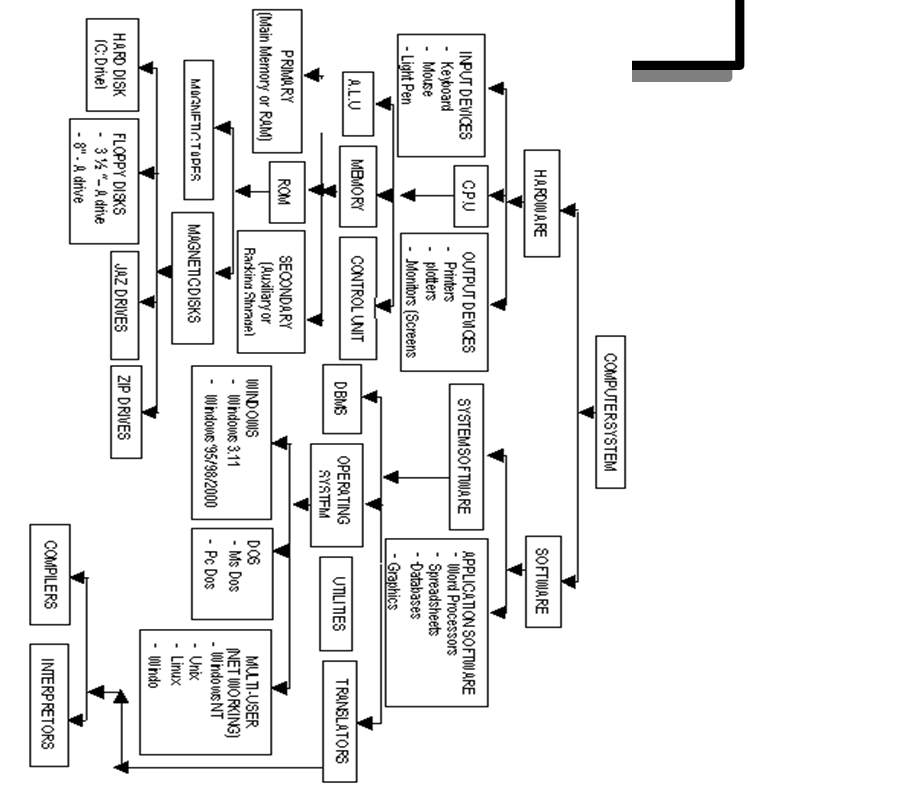
.Diagrammatic Representation of Divisions of Computer
The following diagram shows the basic physical computer Breakdown that will serve as a reference throughout the chapter.
Key:
C.P.0 - Central Processing Unit
A.L.0 - Arithmetic Logic Unit
DOS - Disk Operating System
ROM - Read Only Memory
RAM - Random Access Memory
DBMS- Data Base Management System
2.2 Distinction Between Hardware and Software
A Computer hardware from the simplest point of view is the physical or tangible parts of a computer whereas software are the intangible parts that help the computer to do its task.
From a technical stand point, the following are the valid definitions and hence the distinction between the two terms.
A hardware is a name that describes all the electronic, electrical and mechanical components of a computer together with its peripheral devices.
software is the name that describes all the programs that are used to run the computer or do a specific task together with its documentation.
Explanation of the terms Peripheral devices referred to above are:
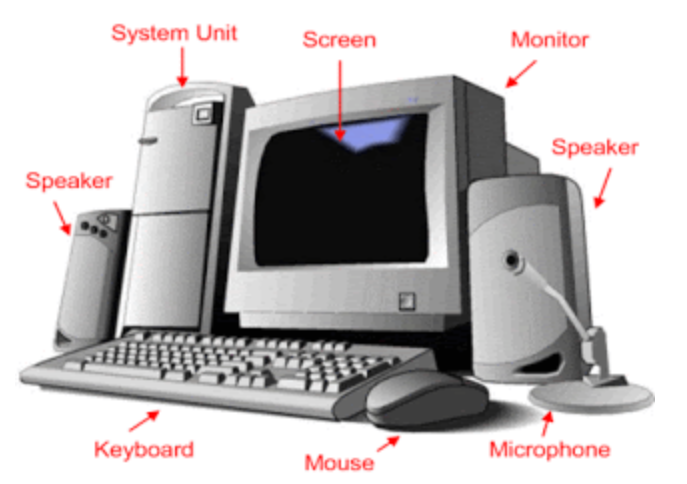
input devices e.g keyboard, mouse or output devices e.g monitor, printer.
These are devices that are used at the periphery or at the side or alongside the computer.
Documentation refers to, in its simplest form, the manual that helps the user to know how the different parts of the software work, how to install it, uninstall, trouble shoot or as a reference book. The definition of software is not complete until documentation is included.
2.3 The Complete Computer System
Because of the recent advances in hardware technology, people have thought of computers as hardware devices only.
This is far from the truth. The fact is,, the hardware is only one part of the complete system. Without programs to tell the computer what to do, they remain immobile and unproductive, just like an automobile without fuel.
A computer system is therefore defined as a combination of hardware devices and programs assembled to accomplish specific tasks. The broad categories of programs are often employed by computer's operation. One category of program is known as Operating system.
As the name suggests, the operating system controls the basic aspects of the computer's operation.
It is the driver of the computer.
The other category consists of the Application program which instructs the computer to perform those procedures necessary to get some jobs done; for example Word-processing, Accounting programs; as a group are often called Software.
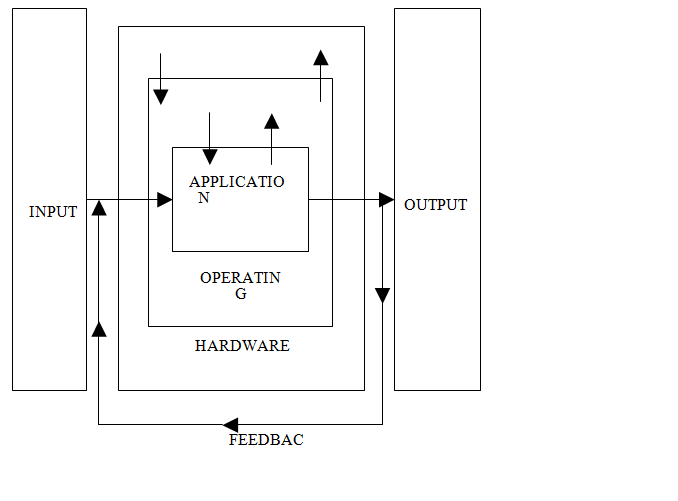
Therefore, the three components of a complete computer system are: Hardware, the Operating System and Application Software.
The following diagram (fig. 2.3) shows the relationship between these three components.
2.4 Elements of a Computer Hardware System
The hardware components of a computer system consist of a set of interconnected electronic and mechanical devices. All computing machines be it a calculator, a microcomputer or a mainframe has the same parts.
The parts of a hardware system are:
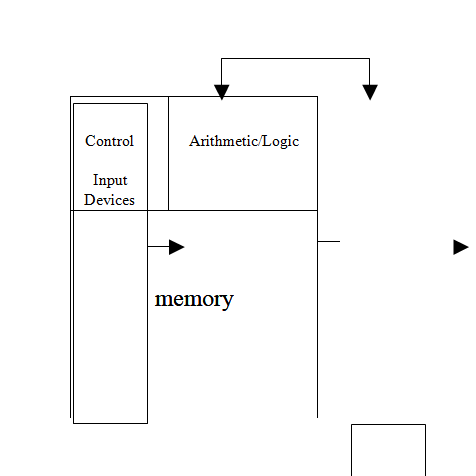
Output devices e.g Monitor, Printer and the Central Processing Unit which comprises of Control Unit (CU) and the Arithmetic Logic Unit (ALU) and Memory.
The figure 2.5 shows the parts of a computer hardware system.
2.5 Functional Organizational of the Elements of a Computer System
Fig. 2.6 below shows the major physical components of a computer system
2.6 Description of the Central Processing Unit
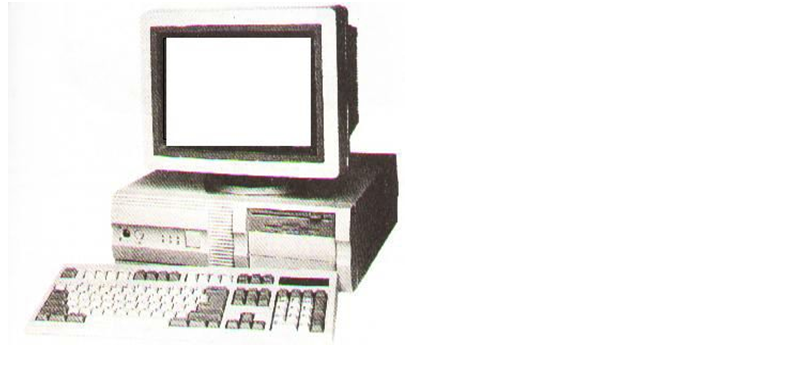
The Central Processing Unit is the main component of a computer hardware system.
It is usually referred to as the CPU.
It consists of three parts. The main part of the CPU is the memory or primary storage, where data being processed and the programs controlling the computer are contained.
Arithmetic Logic Unit forms the second part of the CPU.
The ALU performs the calculations and makes comparisons between units of data.
The last component is the Control Unit (CU), the work of which is to control the operations of the hardware for example by issuing commands to all elements of the computer as per the dictations of memory. (e.g from the input devices to memory, from memory to output devices, etc).
The Central Processing Unit determines the power of a computer hardware system which is described in terms of :
(i) Size of Memory, which is measured by the number of characters of data it can store
(ii) Speed of the Control and Arithmetic Logic Unit, which is measured in millions of instructions per second (MIPS).
The work of the various input devices such as terminal keyboard, disk storage units and tape storage units is to send data into the CPU, whereas the work of the output devices such as printers, visual display units, disk and tape units is to give out the results from the processing operations.
The Central Processing Unit also "houses" Registers.
The latter is a small part in the CPU that holds data before processing or probably after.
They store data to be processed and thereafter partial results.
Registers are of different kinds performing different functions:
(i) Ordinary Counter Register (OC) - This register addresses the next instruction to be expected or we could say it contains the addresses of the next instruction to be executed.
(ii) Instruction Register (IR) - This register contains the actual instruction under execution.
(iii) Accumulator Register -This register stores data to be processed or the results of a partial execution.
The processor communicates with the main memory through 2 registers:
(a) Memory Address Register (MAR)
(b) Data Address Register (DAR) When reading a word from the memory, the CPU stores the address of that word in MAR and sends a read signal to a main memory.
After one memo M cycle, the value of the word is in DAR from where the CPU will search for it. When reading a word, the CPU stores in MAR the address of where the write operation will take place.
The value to be written will be stored in the DAR and then it sends the write signal to the memory.
Execution of an Instruction
The execution of an instruction of the central processing unit is performed through the following steps:
(i) Storage of the next instruction to be executed from the main memory to the instruction register (IR);
(ii) Modification of the contents of the OC registers the address of the next instruction;
(iii) Recording of the instruction recently stored;
(iv) Localization of the data needed by the instructions in the memory;
(v) Storage of data if necessary into the internal registers of the CPU generally the accumulator;
(vi) Execution of the instruction;
(vii) Storage of the results in the appropriate place;
(viii) Return to step () for the execution of the next instruction.
The Processor
The Control and Arithmetic/Logic Units are usually considered as a hardware device separate from the memory.
This is because the size of the memory may vary independently from the Control and Arithmetic/Logic Units.
As separate devices they are known as Processor.
Processors used in microcomputers are known as microprocessors (refer to chapter 1), but conceptually they are the same processors found in larger computer systems.
Memory
Memory A computer's memory stores data before, during and after processing as well as the application program in use at the time.
These data are stored in cells of the memory. Each memory cell contains one byte of data (a byte = 8 characters: a character is say a letter of the alphabet, or a number).
Therefore, one cell will contain eight characters called a byte.
The size of the computer memory is measured in terms of "Kilobytes" or "Megabytes" or "Gigabytes". Since "Kilo" stands for 1,000 and "Mega" for 1,000,000 computer memory is measured by the thousands or millions of bytes that can be stored in memory at one time.
In computer usage, the prefix "Kilo" actually stands for 1024 bytes and "Mega" for 1,048,576 bytes (explanation later in form 2 - Number systems).
Computer memory is sometimes known as Primary memory Storage, Main Memory and RAM (Random Access Memory).
Primary Memory
Primary storage or RAM is the computer's working bench.
All data to be processed must first be recorded in it and all output of results draws data from it.
Primary storage has 2 crucial characteristics.
The first is that data can only be stored temporarily, and two, it cannot store a great deal of data.
Secondary Storage
These characteristics of primary storage give rise to the requirements to store large quantities of data in machine readable form that can be fed into RAM in small segments for processing. Units that do this are called secondary storage devices also referred to as Auxiliary Storage or Backing Storage.
. Description of these devices latter in the chapter The two most prevalent of these are disks and magnetic tapes. These media offer the ability to store data off line, meaning that data can be processed from time to time by the computer system and are not stored permanently as part of the hardware configuration.
When needed, they are mounted on data reading and writing device, called drops, as required by their application programs.
(i) The processor receives data from main storage, performs operations on them, then the result is given back to the same.
(ii) Data then goes to the main memory comes from input devices or secondary devices, and data from the main memory goes to backing storage or output devices.
(iii) The ALU and CU combine to form the processor as discussed.
2.7 Description o
Comments
Post a Comment